Mono Scribble Graphic Arrow – Hands-On Review
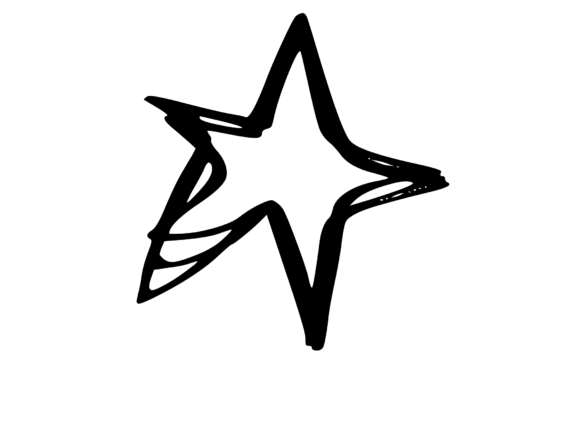
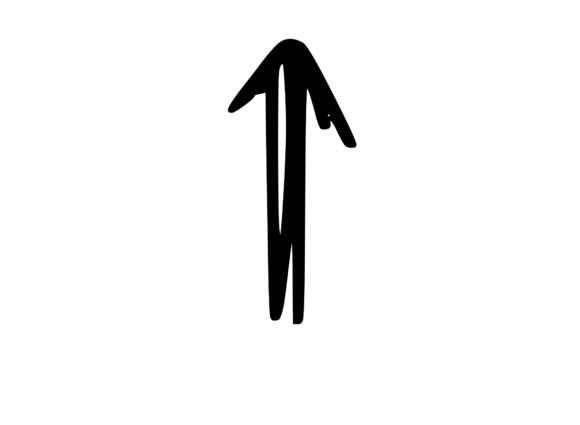
When I first opened the Mono Scribble Graphic Arrow file, I was struck by its raw, hand-drawn energy. This is not a polished, rigid vector. It carries the looseness of a quick sketch, the kind of mark you make when you are thinking on paper. That immediacy is hard to replicate in digital embroidery, and it is exactly what makes this design interesting for real project use. I have been working with machine embroidery designs for years, and I can tell you right away that this piece demands a thoughtful approach. It is not a straightforward fill stitch applique. It is a line-art statement, and it asks you to treat it with the same confidence it was drawn with.
The Visual Personality of This Design
The Mono Scribble Graphic Arrow feels modern and slightly rebellious. It does not try to be perfect. The scribble effect suggests motion, direction, and a handcrafted touch that customers respond to in handmade products. The arrow shape is universal, but the execution makes it feel exclusive. It belongs on products that want to communicate creativity, individuality, or a curated artistic vibe. I immediately thought of tote bags for a local market, sweatshirts for a small boutique, or even a large center motif on a pillow cover for a modern home. The mood is casual, urban, and approachable. It is not a formal or ornate design, so it will not suit heritage-style embroidery or classic monogram work. But for anyone building a craft business around contemporary, minimalist, or hand-drawn aesthetics, this design is a natural fit.
The single-color nature of the graphic is a practical advantage. It simplifies thread changes, reduces stabilizer needs, and keeps production fast. For an Etsy seller or a small shop owner juggling multiple orders, that efficiency matters. It also means the design reads clearly from a distance, which is critical for apparel embroidery where the piece needs to register at a glance. The arrow shape itself is directional and energetic, and the scribble texture adds depth without requiring dense stitch counts.
Real-World Embroidery Performance
I tested the Mono Scribble Graphic Arrow on a midweight cotton sweatshirt first. I wanted to see how the line work handled a slightly textured surface. The result was better than I expected. The scribble effect translated into a series of runs and small satin segments that held their shape well. The key was stabilizer choice. I used a cutaway stabilizer with a medium tack spray, and the design stayed crisp through multiple washes. On a smooth cotton tote bag, the design looked even sharper. The lines sat cleanly on the fabric surface, and the arrow's directional energy felt natural as a center front piece.
I also tried it on a twill cap using a small hoop. This is where the design's simplicity really paid off. Curved surfaces can distort dense embroidery, but the open, sketchy nature of this graphic allowed it to conform to the cap curve without puckering. I did need to adjust the underlay slightly to keep the running stitches from sinking into the fabric, but once dialed in, it stitched beautifully. For a personalized gift like a cap with someone's initial or directional symbol, this design would be a strong contender.
On lightweight fabrics like a baby onesie or a tea towel, I recommend using a water-soluble stabilizer on top to prevent the stitches from pulling into the weave. The scribble lines are not dense, so they do not create a stiff patch. That is a real advantage for baby embroidery and kitchen textiles where softness matters. The design breathes with the fabric rather than fighting it.
Best Applications for This Design
In my opinion, the Mono Scribble Graphic Arrow shines in custom apparel and soft goods where the goal is a subtle but recognizable accent. Here are the applications I would confidently recommend:
- Sweatshirts and hoodies: Center chest or sleeve placement. The arrow reads well at a medium scale and gives the garment a curated, artistic feel.
- Tote bags: Large-scale center design. The scribble effect feels handmade and authentic, which resonates with customers who buy from small shops.
- Pillow covers and home decor: A single arrow on a linen or cotton pillow cover creates a modern, minimalist look that sells well in boutique markets.
- Patches: Because the design is not overly dense, it works beautifully as an embroidered patch on denim jackets, backpacks, or caps. You can stitch it directly or create a standalone patch with a satin border.
- Gift items: Tea towels, aprons, and kitchen linens benefit from a simple, bold motif that does not overwhelm the fabric.
- Digital product previews: As a Graphics asset, this SVG can be used in printable mockups and design assets for your shop listings. It helps communicate the handmade, artistic quality of your finished products.
If you are an Etsy seller or a creative entrepreneur, this design is versatile enough to feature across multiple product categories. That kind of consistency builds brand recognition. Customers who see the same arrow on a cap, a tote, and a pillow will remember your shop.
Where the Design Needs Careful Handling
No design is perfect for every surface, and the Mono Scribble Graphic Arrow has a few limitations worth noting. The scribble style relies on open spaces and thin lines. If you shrink it too much for a small hoop, those lines can become muddy or lose their sketchy character. I would avoid using this design at a final stitch size smaller than about two inches in height. Below that threshold, the detail starts to read as a blob rather than a deliberate scribble.
Dark fabrics require careful thread color selection. A white or light gray thread will pop, but a dark thread on a dark background will kill the contrast and make the arrow disappear. Because the design is essentially line art, contrast is your friend. Test it on your actual fabric before committing to production. I always recommend running a quick test stitch on a scrap of the same material. It saves time and avoids unhappy customers.
Stretchy fabrics like performance knits or thin jersey can also be tricky. The running stitches in the scribble may tent or distort if the fabric is not properly stabilized. Use a medium-weight cutaway stabilizer and consider a slight increase in underlay tension to keep the lines anchored. For caps and curved surfaces, a fusible stabilizer can help the design hold its shape without shifting during stitching.
If you plan to use this design for commercial embroidery products, double-check the licensing for the Mono Scribble Graphic Arrow. Some graphics allow unlimited commercial use, while others require attribution or restrict resale of the digital file. Always confirm before you start selling finished items or digital embroidery files based on the design. The product category is Crafts, and the type is Graphics, so it is likely intended for creative projects, but the exact terms matter.
Practical Notes Before You Stitch
Here are the steps I go through every time I prepare a new design for embroidery, and I recommend you do the same with this arrow:
- Test on scrap fabric first. Use the exact fabric you plan to stitch on. Check the stitch quality, thread tension, and overall look. Adjust if needed.
- Review the stitch count and density. If this information is not provided in the file details, run the design through your embroidery software to confirm it matches your machine's capabilities.
- Check the hoop size. Make sure the design fits comfortably in your hoop with enough margin for stabilizer and fabric handling. Cramped hooping leads to registration issues.
- Inspect small details. Look for any thin areas that might not stitch cleanly. The scribble style should look intentional, not broken.
- Test thread color contrast. Try a black and white mockup first. Then test your actual thread colors against the fabric. High contrast makes the arrow pop.
- Use the right stabilizer. For most woven fabrics, a tearaway stabilizer works fine. For knits and stretchy materials, use a cutaway. For lightweight fabrics, add a water-soluble topper.
- Confirm licensing. Before you sell any finished product or digital embroidery file, verify whether the Mono Scribble Graphic Arrow allows commercial use. This protects your business and your customers.
These steps might seem basic, but I have seen too many small shop owners skip them and end up with a batch of unusable products. A few minutes of testing can save hours of rework.
What This Means for Your Craft Business
The Mono Scribble Graphic Arrow is a design that rewards creativity and careful execution. It is not a plug-and-play motif. It asks you to think about scale, fabric, thread, and placement. But when you get it right, the result is a product that feels personal, artistic, and intentional. Customers notice that. They are drawn to items that look like they were made with thought and care, not mass-produced.
For an Etsy seller, this design can be the anchor of a cohesive product line. Imagine a small collection of tote bags, sweatshirts, and caps all featuring the same arrow in different scales and placements. That visual consistency builds a brand identity that customers remember and trust. It also simplifies your production process because you can reuse the same design across multiple items.
For a hobbyist or a creative entrepreneur just starting out, this design is a low-risk way to test the market. The single-color, moderate stitch count means you can produce a sample quickly and gauge customer interest before scaling up. And because the style is contemporary, it appeals to a demographic that values handcrafted, minimalist design.
I have been reviewing embroidery designs for years, and I can say honestly that the Mono Scribble Graphic Arrow sits in a sweet spot. It is simple enough to stitch reliably, but distinctive enough to stand out. It belongs in the hands of makers who understand that good design is not about complexity, but about clarity of intention. If you approach this design with that mindset, it will serve you well across many projects.
Before you buy, read the product details carefully. Confirm the file format matches your machine, check the stitch count if listed, and review the license. The Crafts category is broad, and Graphics like this are often used in both physical and digital creating. Make sure you have the right version for your needs. Then take the time to test it properly. Your customers will thank you for it, and your finished products will reflect the care you put into the process.